
Watch Live Sports on IPTV: How Sports Hub Finds the Right Channel in One Tap
Stop scrolling through thousands of IPTV channels at kickoff. Learn how GridStreamr Sports Hub brings live scores, lineups, standings, and instant live channel matching together in one place.
Responsible use
GridStreamr does not provide IPTV channels, VOD, or playlists. You bring your own authorized Xtream Codes or M3U sources. You are responsible for complying with applicable terms, licenses, and local law.
Every sports fan who uses IPTV knows the kickoff scramble: the match is starting, your score app says the game is live, and you are scrolling through 4,000 channels across three different categories trying to figure out which network actually has the broadcast.
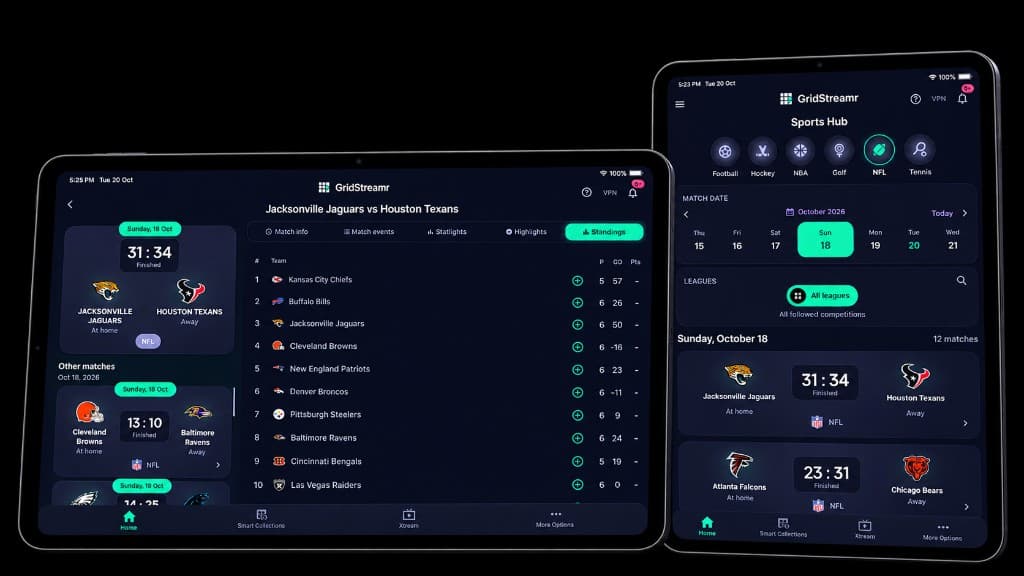
Sports Hub in GridStreamr solves that. Instead of jumping between a sports score app and your IPTV player, you follow your teams, check the live score, see which channels are airing the game, preview the broadcast, and start watching — all in one place.
Why finding live games on IPTV is usually so hard
Even when your playlist has the right channel, finding it at kickoff is frustrating:
- Different countries air the same game on different networks — a Champions League or NFL game might be on one channel in the UK, another in the US, and a third in Portugal or Spain
- Playlist categories are messy — raw provider lists split sports across dozens of regional folders
- Replays and studio shows get in the way — searching a team name often turns up yesterday's recap instead of the live match
- You haven't saved every sports channel yet — your favorite team might play on a network you only need a few times a season
How Sports Hub takes you from the score to the live stream
With GridStreamr v2.4.2, Sports Hub turns match day into a simple flow:
- Pick your game — Browse today's schedule by sport or league, or tap a match directly from your Favorites rail on the Home screen
- See the channels airing the match — Open the broadcast list to see the channels showing the live event, complete with country flags and airtimes
- Match to your playlists in one tap — Even if a broadcast channel is not in your Smart Collection yet, tap Map Channels and Sports Hub finds it in your connected playlists
- Preview before you switch — Tap a channel to see a muted 16:9 live preview right inside the picker so you can confirm the broadcast before going fullscreen
- Save for the rest of the season — Found a great sports channel? Add it straight to your Sports Smart Collection in one tap — and it automatically syncs to your Apple TV and Android TV
Filter by country flag or saved channels
When a major fixture is broadcast around the world, dozens of international networks may carry it. Inside the Sports Hub channel picker, you can:
- Filter by country flag to jump straight to broadcasters in your preferred language or region
- Switch between All Channels, Smart Collections, and Discovered Channels so you can prioritize the channels you already curated or explore new ones in your playlists
- Search by channel name to narrow a long broadcast list in seconds
Never miss kickoff with match reminders
Looking ahead at tomorrow's slate or weekend fixtures? When you tap Watch on an upcoming game that has not started yet, GridStreamr lets you set a programme reminder so your phone alerts you before kickoff.
Watch on phone, tablet, Mac — or send channels to your TV
Sports Hub is included with Premium on iPhone, iPad, Mac, and Android phones and tablets.
If you watch on a big screen with GridStreamr for Apple TV (tvOS) or Android TV:
- Use Sports Hub on your phone to discover the channel airing tonight's game
- Tap Add to Smart Collection right from the channel picker
- Open that Smart Collection on your Apple TV or Android TV — or drop four sports channels into MultiView on your TV to watch four games at once
Try Sports Hub free for 7 days
Start a 7-day Premium trial on the yearly plan on iOS or Android — no credit card required.
Frequently asked questions
Does Sports Hub include live sports channels?
No. GridStreamr does not sell or supply broadcasts. Sports Hub shows live scores, schedules, lineups, standings, and highlights, and connects you to the matching channel inside the playlists you already added.
What if the channel airing the game is not in my Smart Collection yet?
When you open a game, Sports Hub shows the channels airing the live match and can find the matching channel in your connected playlists with one tap. You can preview the broadcast right away or save that channel to a Smart Collection for next time.
Can I preview a channel before switching to fullscreen?
Yes. Select a channel in the broadcast picker to see a muted live preview so you know the game is on before opening the full player.
Which devices have Sports Hub?
Sports Hub is available with Premium on iPhone, iPad, Mac, and Android phones and tablets. Sports Hub for Apple TV (tvOS) and Android TV is coming soon — and any sports channels you save to a Smart Collection on your phone are ready to watch on your TV immediately.
Get started
Download gridstreamr free
Add your sources, build a Smart Collection, then upgrade to Premium in-app when you need more.
Related
Keep reading
Inside GridStreamr Sports Hub: Live Scores, Lineups, Highlights, Golf & Tennis
Explore every sport inside GridStreamr Sports Hub — from football formations and NBA box scores to PGA & LIV Golf leaderboards, ATP & WTA tennis singles and doubles, and in-page video highlights.
Readarrow_forwardIPTV EPG Explained — Guides, Global EPG and Mapping
What an IPTV programme guide is, why provider guides break, and how you can use GridStreamr Global EPG, Free vs Premium timelines, and XMLTV exports for other players.
Readarrow_forwardHow to Add EPG to Any IPTV Playlist
Tired of logo grids with no schedule? Here's how you add a real EPG in GridStreamr — Xtream provider EPG, Global EPG mapping, Premium AI auto-match, and XMLTV export for your other players.
Readarrow_forward