
Sports Hub: Scores, Standings, and the Match on Your Playlist
Premium Sports Hub on iPhone, iPad, and Android follows teams, players, and leagues, then opens a matching channel from your own IPTV playlist. Apple TV (tvOS) and Android TV are coming soon.
Responsible use
GridStreamr does not provide IPTV channels, VOD, or playlists. You bring your own authorized Xtream Codes or M3U sources. You are responsible for complying with applicable terms, licenses, and local law.
Match day usually means two apps: one for the score, and another to hunt the channel. Sports Hub keeps both jobs in GridStreamr. Follow the teams, leagues, and players you care about, see the day, then open a matching channel from a playlist you already have.
Follow the day, then watch
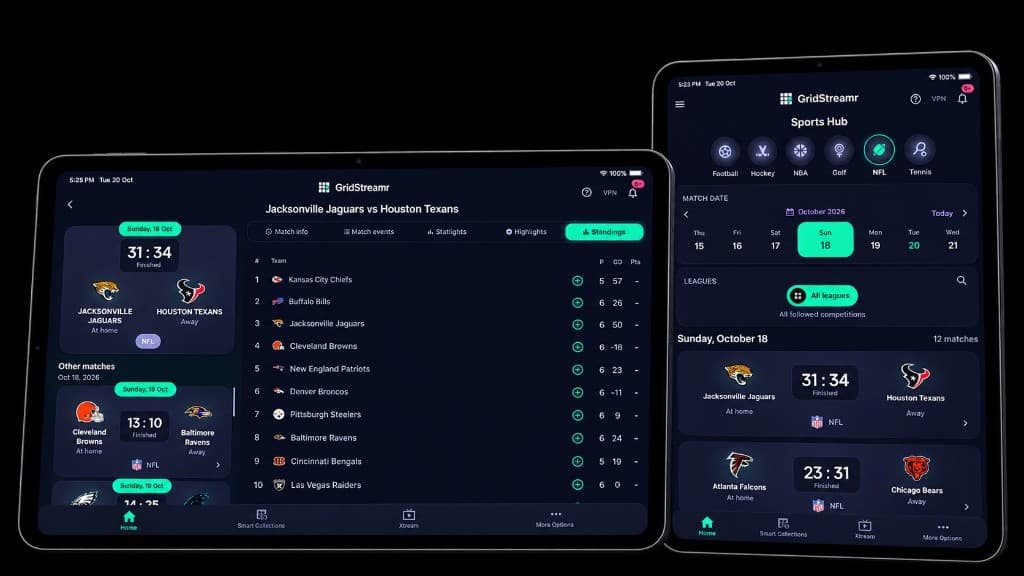
Open Sports Hub from the app, pick a sport, and move through the calendar. A league filter narrows the day to one competition, or you can leave it on every league you follow. Each fixture is a scoreboard card: crests, score, and a live badge when the match is on.
Live matches refresh about once a minute, so the score on the card stays current while you browse. From the home screen, a favorites row shows the teams you follow without opening the full hub first.
On a tablet in landscape, the day sits in a two-column grid. Open a match and the standings stay beside the score, which is the layout in the photo above: the table on one side, the finished result and the rest of the day's matches on the other.
What you can follow
Choose the sports you want in Settings, then star teams, leagues, or players. Sports Hub only lists competitions it can actually show.
| Sport | What you can follow |
|---|---|
| Football | Premier League, LALIGA, Serie A, Bundesliga, Ligue 1, UEFA club competitions, MLS, Liga MX, Brasileirão, and other leagues and cups, including the World Cup |
| American football | NFL and college football |
| Basketball | NBA, WNBA, and college basketball |
| Baseball | MLB |
| Hockey | NHL and college hockey |
| Rugby | United Rugby Championship, Top 14, The Rugby Championship, Rugby World Cup, and NRL |
| Volleyball | College volleyball |
| Lacrosse | Premier Lacrosse League and National Lacrosse League |
| Tennis | ATP and WTA |
| Golf | PGA Tour, LPGA, DP World Tour, LIV Golf, PGA Tour Champions, and the Korn Ferry Tour |
Search finds more leagues inside those sports. From a standings table you can add a team you just noticed, without going back to Settings first.
A match, not just a score
Open a fixture and Sports Hub shows only the tabs that have something to say:
- Lineup — formation, kit markers, and the bench
- Events — goals, cards, and substitutions on a timeline
- Statistics — possession, comparison bars, and leaders
- Highlights — clips when they are available, in the same preview player used for movie trailers
- Standings — the table for that competition
- Info — competition, round, and venue when that detail exists
Empty tabs stay hidden. A golf leaderboard does not pretend to be a football lineup.
Golf and tennis
Golf is a tournament, not a head-to-head score. Sports Hub shows the leaderboard, the round, and a player profile with the photo when one is available. Tennis shows the set-by-set score, the court, and player facts such as ranking. ATP and WTA profiles use the same layout, so a phone in portrait and a tablet in landscape both stay readable.
Open the channel you already have
When the guide has a programme that matches the fixture, Watch lists those channels. Pick one and GridStreamr opens it in the player. If several channels carry the match, you choose. If none do, there is nothing to open — Sports Hub will not invent a stream.
That is the point of keeping scores next to a Smart Collection. The hub tells you the game has started. Your playlist is what you watch.
Where Sports Hub runs
Sports Hub is a Premium feature on iPhone, iPad, and Android phones and tablets today. Set it up once on the phone; the sports you follow stay with your account.
Apple TV (tvOS) and Android TV are coming soon. Until then, use Sports Hub on the phone or tablet beside the TV, and watch the channel in GridStreamr on Android TV if that is the screen you already use. Sports Hub is not part of Android Auto.
Scores, schedules, standings, and the rest of Sports Hub come from publicly available information. That data is not guaranteed. It can be delayed, incomplete, or wrong, and GridStreamr does not control it. Treat the hub as a guide to your own channels, not as an official results service.
Follow the match from the app you already watch in
Sports Hub is included with Premium on iPhone, iPad, and Android.
Frequently asked questions
Is Sports Hub included in Free?
No. Sports Hub is a Premium feature on iPhone, iPad, and Android phones and tablets. Start a 7-day free trial on the yearly plan inside the mobile app. No credit card is required for that trial.
Which sports can I follow?
Football, NFL and college football, NBA, WNBA and college basketball, MLB, NHL and college hockey, rugby, college volleyball, lacrosse, ATP and WTA tennis, and golf tours including the PGA Tour, LPGA, DP World Tour, LIV Golf, PGA Tour Champions, and the Korn Ferry Tour. Pick the sports you care about, then follow teams, leagues, or players.
Does GridStreamr provide the sports channels?
No. Sports Hub shows scores, schedules, standings, and match detail. When a programme in your EPG matches the fixture, Watch opens that channel from a playlist you already connected. GridStreamr does not supply the broadcast.
Where is Sports Hub available?
Sports Hub is on iPhone, iPad, and Android phones and tablets today. It is coming soon on Apple TV (tvOS) and Android TV. It is not part of Android Auto.
Can the score be wrong or late?
Yes. Scores, schedules, standings, and other Sports Hub information come from publicly available information. That data is not guaranteed and may be delayed, incomplete, or inaccurate. GridStreamr does not control it.
Can I follow a tennis or golf player?
Yes. Tennis and golf are player sports. Open a match or tournament, then follow a player to see their profile, results, and the events they are in.
Get started
Download gridstreamr free
Add your sources, build a Smart Collection, then upgrade to Premium in-app when you need more.
Related
Keep reading
AI Channel Categorization
AI Channel Categorization — practical GridStreamr guidance for organize iptv channels ai. Bring your own Xtream or M3U sources; we handle organisation, EPG and playback tools.
Readarrow_forwardEPG Notification Alerts
EPG Notification Alerts — practical GridStreamr guidance for iptv epg notifications. Bring your own Xtream or M3U sources; we handle organisation, EPG and playback tools.
Readarrow_forwardHome Screen Live Channels Widget
Home Screen Live Channels Widget — practical GridStreamr guidance for iptv home screen widget. Bring your own Xtream or M3U sources; we handle organisation, EPG and playback tools.
Readarrow_forward